How to check FMCSA SMS without confusing it with a safety rating
Walk through SMS, SAFER and authority links: verify USDOT identity, dates and public-access limits before interpreting a carrier record.
A search for “FMCSA safety score” can lead a driver, shipper or dispatcher to several different records. The Safety Measurement System, a carrier's formal safety rating and its operating authority are not interchangeable. Use this walkthrough to identify the business, open the relevant official record and record what the screen actually shows. It is a checking process, not a shortcut for declaring that a carrier is safe or unsafe from a single number.
Put the right identifier beside the right question Start with the carrier's USDOT number, if available, and the question you need to answer. Are you checking inspection information, a formal safety rating, or licensing and insurance? Write that question before opening multiple tabs. A company name can be similar to another business name, and a dispatcher may use a trade name that differs from the legal entity on a record.
Use the USDOT number to reconcile the identity shown on each official screen. If you search by name first, verify the number and company details before continuing. Do not merge records because the city or a familiar logo looks right. Keep any inconsistency as a question for the responsible company representative rather than silently choosing the more convenient result.
Step 1: open the official SMS search Go directly to the FMCSA Safety Measurement System home page linked below. Check the government domain before entering information. The public search accepts a carrier name or USDOT number. Use that search to locate the carrier you intend to review, then confirm the identifier again on the resulting page. The screenshot in this guide shows the public starting screen, not a fabricated carrier report.
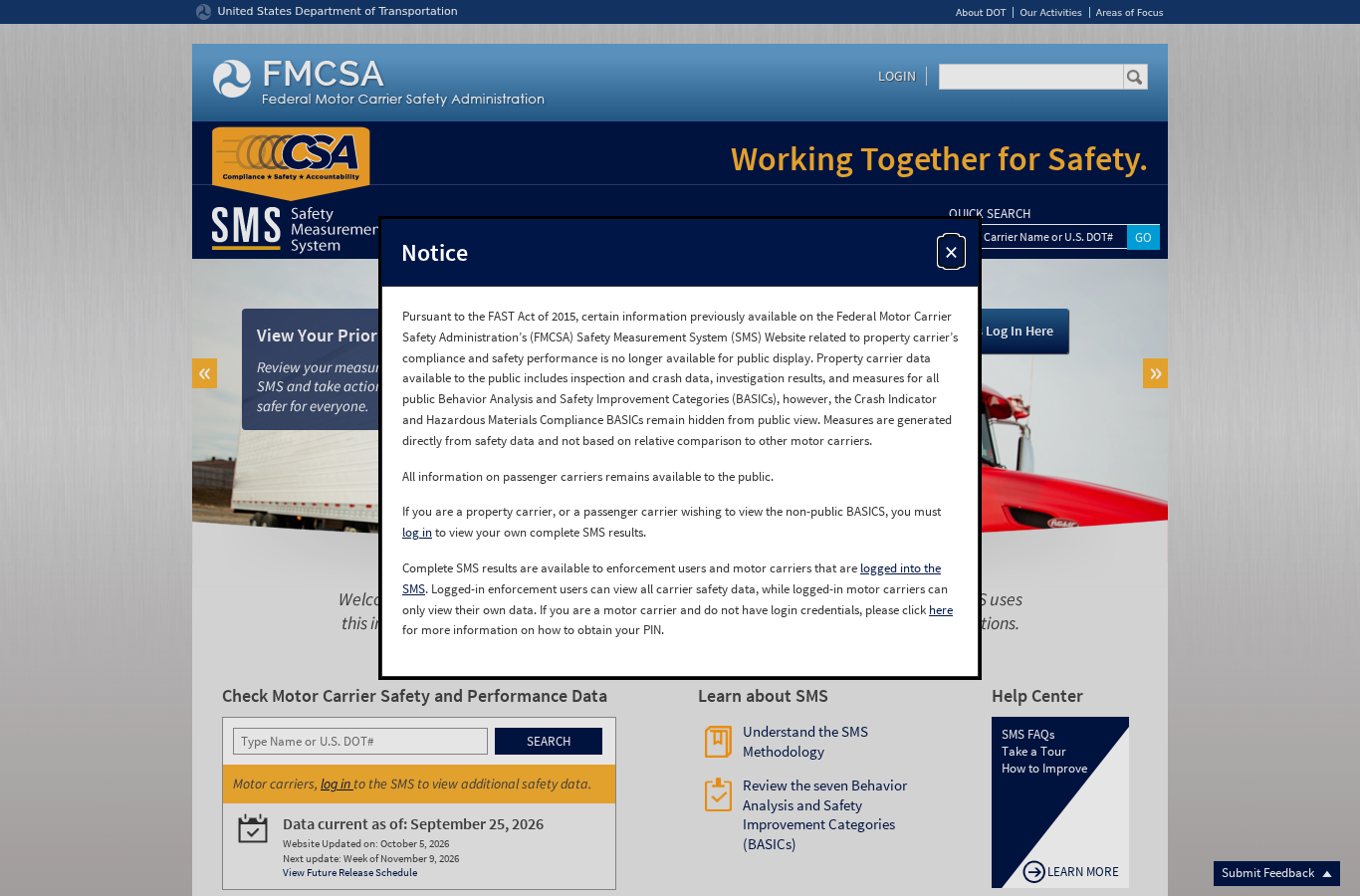
Read any notices shown on the current site before interpreting the result. A search interface or access requirement can change. If a page redirects or the service is unavailable, record that limitation and return through the official home page. Do not substitute a marketing company's “score report” without identifying that it is a different source.
Step 2: read the period and visible categories Record the period or update information shown with the data you are reviewing. A screenshot without its date can make an old condition look current. Note which categories and details are visible, and distinguish information not displayed from a result that explicitly reports zero. This is particularly important when one user has authenticated carrier access and another is reading only the public view.
FMCSA's SMS notice explains that some property-carrier information is not publicly displayed and that a carrier needs authorized access to see its complete results. Do not treat a public screen as proof that every category has been reviewed. Equally, do not ask someone to send a password or portal credential in a shared dispatch conversation to fill the gap.
Step 3: check a safety rating in the separate record The SMS home page directs readers to SAFER for motor-carrier safety ratings. Open the official Company Snapshot and verify the same USDOT number. Read the actual field and its date; do not convert an SMS measure or an intervention indicator into a formal rating. If no rating is shown, report what the record says rather than assigning your own category.
FMCSA explicitly warns against drawing conclusions about overall safety condition solely from the displayed SMS data. A useful internal note therefore names the record, the date and the observation. “SMS public view checked” is different from “formal rating confirmed,” and neither phrase answers every commercial due-diligence question by itself.
Step 4: keep authority and insurance separate For a licensing or insurance question, use the official Licensing and Insurance link provided by FMCSA and follow the current site instructions. Confirm the entity before reading its status. A carrier's name appearing in an SMS search does not establish that the specific authority or insurance required for a transaction is active. Record that verification separately from an inspection-data review.
An illustrative dispatch file might have three dated entries: identity checked by USDOT number; inspection information reviewed in SMS; and authority-related information checked in the official licensing record. This is a suggested way to organize your work, not a claim that those three steps satisfy every contract or regulatory obligation.
A record you can hand to the next dispatcher Use a compact template: purpose of check; legal name and USDOT number; official URL; access level; date checked; data period displayed; factual observation; unresolved question; person responsible for follow-up. Write observations in plain language. Keep “not publicly visible,” “service unavailable” and “not applicable” as different outcomes so a future reviewer knows what happened.
Avoid pasting an entire private portal report into a broadly shared worksheet. Store operational records according to company policy and disclose only what the receiving person needs. If the check is part of onboarding or a commercial decision, let the responsible safety or compliance employee interpret the record alongside the other required information.
If a record appears incorrect Check whether you opened the intended carrier and whether the displayed period explains the difference. Preserve the relevant reference or screenshot without altering it. The official DataQs system is a route for requesting review of eligible FMCSA data; it is not a promise that a record will be changed. Follow the agency's current instructions and your company's process for submitting evidence.
Do not respond to an apparent discrepancy by accusing another business in public or buying a service that promises to erase a “score.” Distinguish a documented data question from an adverse finding. That makes it easier for the responsible person to investigate without losing the original context.
Make the check reproducible A repeatable check identifies the entity, source, date and limitation. Use the official links below and our companion article about why one score misses fleet risk for the analytical context. If the review highlights a mechanical concern that needs inspection, arrange the appropriate service separately with a qualified provider such as The Truck Savers™; a website lookup cannot inspect the truck or clear a defect.
Continue with these tools
Related guide: context and next step
Ask The Truck Savers™ about the mechanical service appropriate for your equipment. Confirm scope and appointment directly.
Official sources and verification
Practical guide checked November 6, 2026. AI-generated illustrative cover; it does not depict a specific branch or customer.